

Claude Code Hooks: The Rules an Agent Can't Talk Past

Claude Code hooks are commands you register against lifecycle events, like SessionStart or PreToolUse, in your settings.json. They fire every time that event happens, whether the model wanted them to or not. That makes a hook the one place you can put a rule the agent can't talk its way past.
Everything else you give an agent is a suggestion. Hooks aren't. That's why I build my guardrails out of them.
Does Claude support hooks?
Yes. Claude Code supports hooks, and they're the deterministic layer of the whole tool: automation that runs on lifecycle events regardless of what the model decides.
That last part is the whole story. Look at the building blocks Claude Code gives you. Subagents are specialized workers inside a session. Skills are reusable instructions. MCP connects outside systems. Agent teams coordinate separate sessions. And hooks run on lifecycle events.
Four of those five are up to the model. It decides when to call a skill, when to spawn a subagent, which MCP tool to reach for. Hooks are the only one it doesn't get a vote on. A hook fires whether or not the model wanted it to. Which is exactly what you want from a guardrail, right?
So when people ask me where to put a rule that absolutely has to hold, the answer is always the same. Not in the prompt. Not in CLAUDE.md. In a hook.
What are hooks in the Claude Code lifecycle?
A hook is a command attached to a lifecycle event, a named moment in a session like the session starting, a tool about to run, or the agent stopping. When that moment happens, Claude Code runs your command.
The easiest way to show you the lifecycle is to show you what my own settings.json registers against today. Your version may list more or fewer, so check yours, but this is my real list:
- Session boundaries: SessionStart, SessionEnd
- Your input: UserPromptSubmit
- Tools: PreToolUse, PostToolUse, PostToolUseFailure
- Permissions and alerts: PermissionRequest, Notification
- Subagents: SubagentStart, SubagentStop
- Context management: PreCompact, PostCompact
- Stopping: Stop, StopFailure
- Teams: TeammateIdle
The one you'll care about first is PreToolUse. It runs before a tool call happens, which means it can refuse the call. That's the gate. Everything after the tool runs, PostToolUse included, can only react. It can't un-run anything.
The session boundary events are where memory and logging live. On mine, a provenance logger fires on SessionStart, UserPromptSubmit, Stop, SubagentStart, SubagentStop, PreCompact, Notification and SessionEnd. So every session leaves a trail on disk whether the model remembered to write one or not.
How to hook up a Claude code?
You hook something up by adding it under the hooks key in settings.json: pick the event, optionally add a matcher to narrow when it fires, and point it at a command. Here's the shape of one of my real entries, with the command swapped for a placeholder:
{
  "hooks": {
    "SessionStart": [
      {
        "matcher": "^(startup|resume|clear|compact|fork)$",
        "hooks": [
          { "type": "command", "command": "python hooks/log-session.py", "timeout": 10 }
        ]
      }
    ]
  }
}
Three pieces to notice.
The matcher narrows the event. On my SessionStart entry it matches startup, resume, clear, compact and fork, so the hook runs on every flavor of session start. On tool events, a matcher narrows which tools trigger it. Mine uses * on PreToolUse, which means every tool.
The command is just a script. Python, PowerShell, Node, whatever you already use. It doesn't need to know anything about AI.
The timeout caps how long it can run. Mine is 10 seconds on that entry. Keep hooks fast, because some of them fire on every single tool call.
Where the file lives matters too. Mine sits at user level, in ~/.claude/settings.json, so every hook in it applies to every project I open on that machine. That's what I want for logging and safety rules. A rule that only makes sense for one repo belongs with that repo instead, not in the file that follows you everywhere.
Then test it before you trust it. Spin up a throwaway worktree, trigger the event on purpose, and watch the hook fire. A hook you never saw fire is a hook you're only hoping works.
Want a first hook that pays for itself right away? Steal a pattern from a 2026 practitioner walkthrough in my transcript library: a PreToolUse hook that blocks the agent from modifying anything under a test directory, or any path containing the word "test." The failure it stops is a nasty one. The agent edits the tests instead of making the code pass them. Green checkmarks, broken code. A hook ends that for good.
What are the best hooks in Claude Code?
The best hooks are the ones that encode a rule you never want to argue about again. If you'd be upset to find out the agent skipped it, it's a hook candidate. If it's a judgment call, it isn't.
In practice, the good ones fall into three buckets.
- Protected paths. The test-directory block above. Same idea works for migrations, env files, anything where one bad write costs you a day.
- Shipping gates. Hooks that stop a commit, a push or a deploy unless a condition holds. This is where hooks earn the most, because a mistake caught before commit costs you a failed check. A mistake caught after costs you a review cycle, a revert, and whatever got built on top of it.
- Logging. It's not glamorous, you know, but it's the one I'd keep if I could only keep one. A logger on the session and subagent events means you can always reconstruct what happened, even when an agent's own report is thin.
Notice what's not on that list: "make the code good." A hook can't judge quality. It can run a validator that checks a rule, and that's different.
If you're starting from zero, here's the order I'd add them in. Logging first, because it costs nothing and every later hook is easier to debug when you can see the trail. Protected paths second, because they're one condition and they stop the most expensive kind of mess. Shipping gates last, once you know exactly which condition you want enforced. A gate built on a fuzzy rule just blocks good work and gets switched off within a week.
The four gates I run, and the mistake each one caught
My enforced-template repo is a Claude Code project template built around four enforcement hooks: a plan gate, a tech stack enforcer, a spec gate and an SEO validator. Each one blocks a different kind of bad agent commit before it lands.
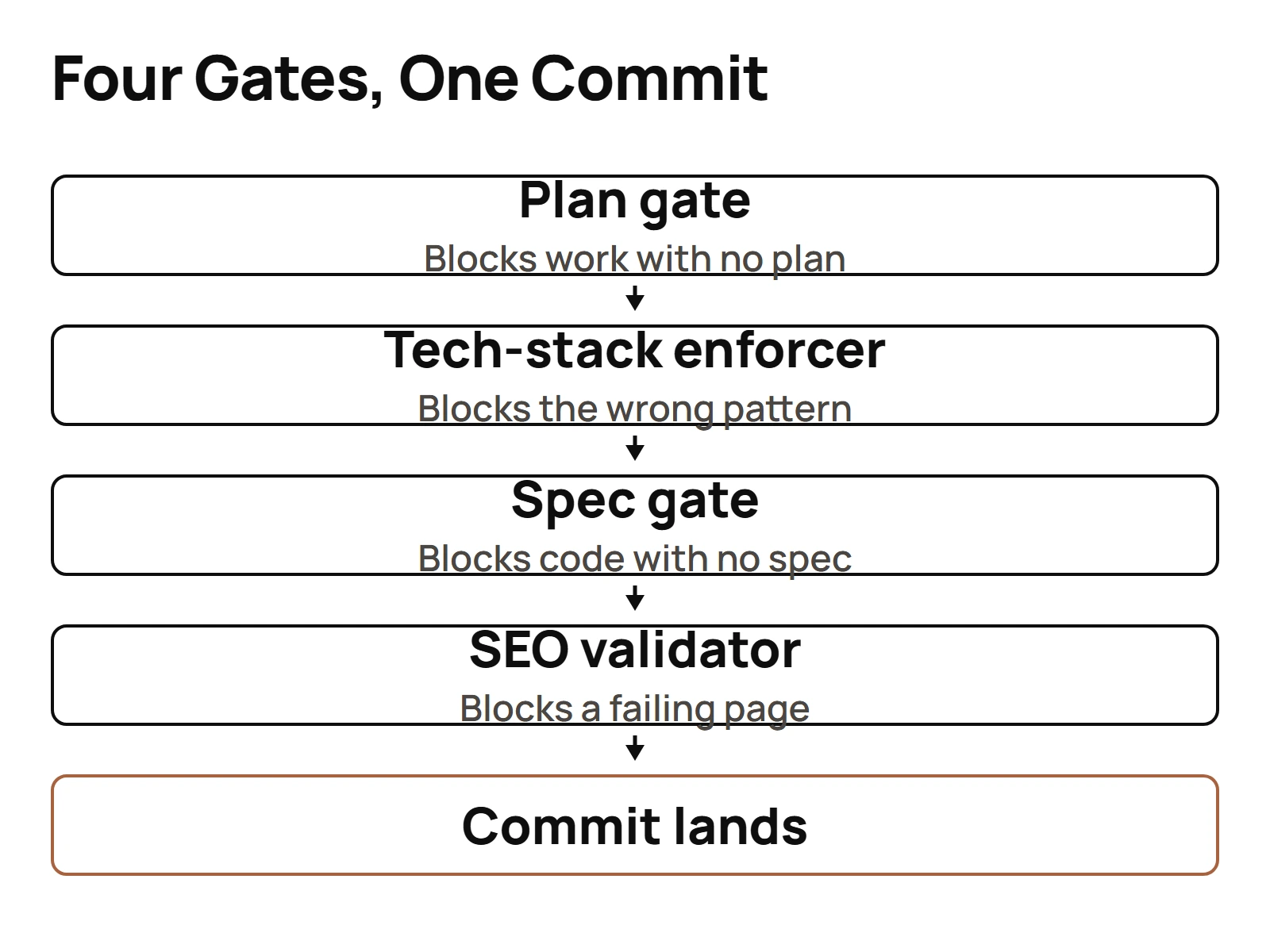
I'll be straight with you on the heading. My records don't pin one logged incident to each of those four. What I can give you is the class of mistake each one exists to stop, plus one real block I can point to by date.
- Plan gate. Stops an agent writing code before it has said what it's going to do. Most bad commits trace back to an agent that started typing before it settled on an approach.
- Tech stack enforcer. Stops it reaching for a library or pattern the project doesn't use.
- Spec gate. Checks the work against a written spec instead of trusting the agent's own opinion that it finished.
- SEO validator. For content work, checks output against rules a human would otherwise check by hand every single time.
Think of the whole set as a pre-commit layer, like a git pre-commit hook, except it sits at the agent's tool layer and fires before the agent even gets to git.
Now the dated one. On June 21 and June 22 of this year my logs show a PreToolUse hook called score-gate firing on Bash calls with this message: "the MAIN session is trying to BUILD / DEPLOY / PUSH / COMMIT solo." Then: "Shipping is the band's job, not the orchestrator's."
Read that again. The session it blocked was my MAIN one, the orchestrator, trying to ship on its own when the rule said a lead does the shipping. The hook didn't care who was asking. In one of those logged sessions, the very next move was a dispatch through the Agent tool. The agent got stopped, and it went and did it the right way.
That exact gate isn't in my live settings.json anymore. The fleet changed shape since then. But it's the cleanest proof I have of why hooks beat instructions. I'd written that rule down. The main session still tried. The hook held.
The full breakdown of the template lives in the four gates I run in production.
When a hook is the wrong tool
A hook is the wrong tool whenever the check needs judgment. Hooks are deterministic. They're perfect for "never do X" and terrible for "do X well."
Some quick tells:
- "Is this copy good?" Not a hook. That's a reviewer, a person or a QA lead agent.
- "Did it pick the right approach?" Not a hook. A plan gate can force a plan to exist. It can't grade the plan.
- "Only block this sometimes." If you can't write the condition as code, you can't write it as a hook. And a hook that fires on the wrong things trains everyone to ignore it.
- Anything slow. Some events fire on every tool call. A 30-second hook on PreToolUse will make the whole session crawl. Keep them in the seconds.
An internal SOP of mine carries a pre-launch checklist that makes the line clear: "Reranking improves relevance," "Context fits token limits," "Responses cite sources." The second one is a hook, you can count tokens. The other two need someone to look.
So the split I use: hooks for the rules, people and review agents for the taste. Set up the rules first and your reviewers stop wasting time on stuff a script could've caught. If you're still getting Claude Code itself running, start with the basics before you touch Claude Code day to day, then come back and add your first PreToolUse gate. That's where the payoff starts.
Questions people actually ask
- What are the best hooks in Claude Code?
- The best hooks encode a rule you never want to argue about. Start with a logger on session and subagent events, then a PreToolUse block on protected paths like your test directory, then shipping gates that stop a commit or deploy unless a condition holds. Leave judgment calls like code quality to reviewers.
- Does Claude support hooks?
- Yes. Claude Code supports hooks as its deterministic layer: commands that run on lifecycle events regardless of what the model decides. Skills, subagents and MCP tools get used when the model chooses to use them. A hook fires whether the model wanted it to or not, which is exactly why hooks work as gates.
- What are hooks in the Claude Code lifecycle?
- They're commands attached to named moments in a session. My settings.json registers hooks on SessionStart, UserPromptSubmit, PreToolUse, PostToolUse, SubagentStart, SubagentStop, PreCompact, Stop and SessionEnd, among others. PreToolUse is the one that can refuse a tool call before it runs, so that's where the gates go.
- How to hook up a Claude code?
- Add an entry under the hooks key in settings.json. Name the event, optionally add a matcher to narrow when it fires, and point it at a command with a timeout. Keep the command fast, since some events fire on every tool call, and trigger it once in a throwaway worktree before you trust it.