

How to Use Claude Code: The Workflow My Agent Fleet Runs

You use Claude Code by opening a terminal inside a git repo, typing claude, and handing it a real task in plain English. It reads your files, proposes edits, runs commands, and asks before it does anything risky. That covers day one. Running it the way a production fleet does takes four more habits.
I'm going to give you both. The day-one stuff goes fast. Then comes the part I actually care about, which is how I run Claude Code across a fleet of 40-plus named agents every single day without the whole thing turning into a mess.
What Claude Code actually is, and what it replaces
Claude Code is Anthropic's agentic coding tool, and it lives in your terminal as a CLI. You don't paste code into a chat window and then paste the answer back into your editor. You point it at a folder and it works inside that folder. It reads, it writes, it runs your tests, it runs git.
That's the whole shift. Agentic coding means the model takes the action instead of just suggesting it.
So what it replaces first is the copy-paste loop. You know the one. Ask a chatbot, copy the snippet, paste it, hit an error, copy the error back, repeat until you give up or it works.
In my setup it replaced a lot more than that. Claude Code isn't an app I open when I have a task. It's the default identity of every terminal I open. One persistent assistant loads in every runtime I use, whether that's Claude Code, Codex, Gemini CLI, Hermes or OpenClaw, and it picks up where the last session ended. No greeting. No re-explaining who I am.
Behind that assistant sits a routing layer. My own instruction file says routing to a named specialist is "the default, not a judgment call." Design goes to one lead. Front end goes to another. App code, content, semantic SEO, technical SEO, local and GMB, research, security, each one has an owner. Doing the work hands-on is reserved for a short list: admin, a question, a one-line fix, a config edit, a doc tweak, or reading and reporting.
Quick scale check so you know where this is coming from. As I write this, my project root file lists 1,498 GitHub repos, 1,082 skills, 219 tools and a Master Brain of roughly 850K vectors. Those numbers move every week, so treat them as a snapshot.
The size isn't the point though. The point is what the size forces. One rule in that file reads "REGISTRY FIRST, you probably already built it," and it calls building a duplicate "the #1 failure mode of this workspace." When you run Claude Code at volume, the hard problem stops being "can it write this" and becomes "did we already write this."
Installing Claude Code and running your first real task
Install it from Anthropic's official Claude Code docs. I'm not pasting an install command here on purpose. Install instructions age fast, and a stale command copied off somebody's blog is exactly how people end up debugging their setup instead of using it.
Once it's in, confirm it:
claude --versionMy box reports 2.1.280 as I write this. Yours will say something different, and that's fine.
Now the first task. Not "hello world." Give it something REAL, just small. Here's the order I'd run it in:
- Open a terminal inside a git repo you're comfortable experimenting in.
- Put yourself on a branch or, better, a git worktree, so nothing lands on main.
- Type
claudeto start a session. - Ask it to explain the repo back to you before it touches a single file.
- Give it one narrow, specific change.
- Read the diff before you accept anything.
Why make it explain first? Because of a note I saved for myself back when I was on Claude Code v2.1.156: "Code is the best context," and under it, "Keep context window lean. Break features into small PRs. Plan first." The version moved on. That principle didn't.
Then give the project a CLAUDE.md, a plain text instruction file at the root of the repo that tells the agent the rules of the house. Keep it short. My own global rules call a project CLAUDE.md "a short map, not a workflow manual," and that's the right size. The one sitting in the template this site was built from is a handful of lines: rebrand through one config file and the CSS tokens only, never paste the source site's copy or photos, keep every section animated, no em dashes in copy. That's it. Four rules the agent can't claim it didn't know.
If the first task goes sideways, good. That's what the worktree is for. Throw it away, start a fresh one, tighten the ask, run it again. Losing ten minutes on a disposable branch is how you learn what a clear instruction looks like to this tool.
There's a money reason for keeping all of this tight, and it's mechanical. Every prompt, tool call, file read and thinking block draws from the same plan allowance. There's no separate budget for "reading files" versus "writing code." A session that reads 40 files to orient itself has spent real allowance before it produces a single edit. So scope your first task tight and you learn the tool without burning your week on orientation.
Do I need to learn how to code to use Claude Code?
No, you don't need to learn to code to start using Claude Code. You do need a way to tell whether the work is right, and that part doesn't come for free.
Here's how I handle it, and it doesn't depend on reading every line.
My build loop has a beat called Prove. You capture the before-state while you reproduce the problem, and you capture the after-state once it works. That's evidence you can check without being a developer. Does the page load now? Does the test pass? Does the before screenshot show the bug and the after screenshot show it gone?
The other half is ownership. In my fleet, app code has an owner, an engineering lead agent named Dan. The rule is explicit: don't do a lead's work directly "because it looks quick." So the question I'm answering isn't "can I write this code." It's "is this done, and can the lead prove it."
Knowing some code helps you judge faster. It's not the entry fee.
How do I run the Claude code?
You run Claude Code by typing claude in a terminal from inside your project folder. That starts an interactive session where you talk to it in plain English and it works on the files in that folder.
The CLI's own help spells out the two modes:
claude                        # interactive session (the default)
claude -p "summarize this repo"   # print mode, non-interactive, then exits
Interactive is where you'll live day to day. Print mode is for scripts and automation, anywhere you want one answer back and no conversation.
Then there are permissions. By default Claude Code asks before it does risky things. You can pre-approve specific tools with --allowedTools, and the help gives Bash(git *) as an example pattern. There's also a flag that bypasses every permission check, and the CLI's own help text says that one is recommended only for sandboxes with no internet access. Take that literally. It's not a convenience setting.
Honestly though, WHERE you run it matters more than how. I run every coding task in its own git worktree, never on main, which is the next section.
What do I do with the code from Claude?
You treat it like code from a new hire. It goes on a branch, it gets proven, it gets reviewed, and only then does it merge. It never goes straight onto main.
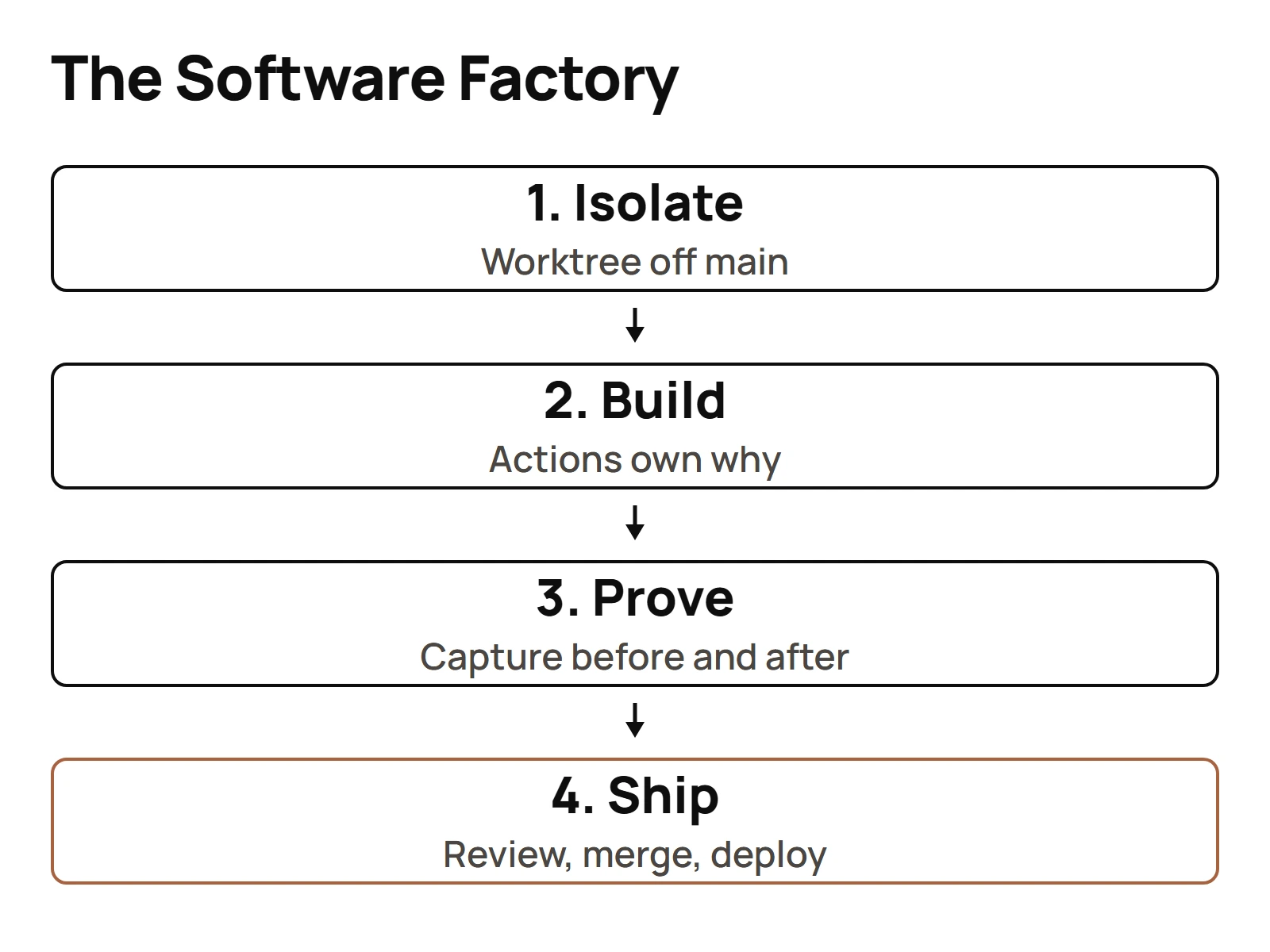
Here's the loop my global instruction file enforces for every piece of code work in a git repo. Four beats, no size threshold, no exceptions:
- Isolate. A worktree branched off
origin/main. Never build on main. - Build. Actions own the why and the when. A service layer owns the reusable how.
- Prove. Capture the before-state while reproducing, the after-state once it works.
- Ship. A PR with before and after proof, then an automated review loop until it scores 5/5 with zero unresolved comments, then merge, deploy, and log it to the vault.
A one-line fix gets the same worktree, branch, PR and review loop as a feature. Sounds like overkill for a typo, right?
The reason is written into the rule itself: "the point of the factory is that it is not a judgment call." The second you let yourself decide which changes deserve the process, you'll decide wrong on the one that mattered. So nobody decides. Everything goes through.
That's also what makes running more than one agent possible. If every task lives in its own worktree, two agents can't stomp on each other's files. I wrote up how I run several coding agents at once if you want the mechanics.
How to use Claude Code for free?
Straight answer: I couldn't verify a free way to use Claude Code, so I'm not going to hand you one. The research I trust covers the paid plans, and as of September 2026 every paid Claude plan meters Claude Code usage, starting with Pro at $20 a month, then Max 5x at $100 and Max 20x at $200.
Here's how that metering works, because it confuses people. There are two meters running at the same time:
- A session limit that resets every five hours.
- A weekly limit across all models, which resets at a fixed time assigned to your account.
Both run at once. You can be well inside your five-hour window and still get stopped by the weekly cap.
And here's the fact that clears up half the confusion online. Anthropic publishes no token count for Pro or for any other plan. None. So when a blog post tells you "you get X tokens per five hours," they're guessing or extrapolating from one person's session. The only real view of your remaining allowance is /usage inside Claude Code itself, or Settings > Usage on claude.ai.
One trap to watch for. You'll still find posts saying weekly Claude Code limits are boosted 50% on all paid plans. That promotion ended at 11:59 PM PT on September 13, 2026. Since September 14, the standard weekly limit has been permanently 25% higher than before the promotion, which is still about 17% less than the boost. Don't plan your month around the old number.
So what's the closest thing to free? Not wasting what you pay for. Since everything draws from one allowance, a lean context, a tight task and a session that doesn't re-read the whole repo every time will stretch a Pro plan a lot further than any trick you'll find in a comment section.
The four things that separate casual use from production use
Casual use is one person, one session, one chat. Production use is when you stop trusting yourself to remember the rules and start building them into the setup. These are the four habits that made the difference for me.
- Isolation. Every task gets its own git worktree, branched off
origin/main. Covered above, and it's first on purpose, because nothing else on this list works if two agents share a working directory.
- Gates. Claude Code has a small set of building blocks. Subagents are specialized workers inside a session. Skills are reusable instructions. Hooks are the automation layer that runs on lifecycle events regardless of what the model decides. MCP connects outside systems. Agent teams coordinate separate sessions.
Hooks are the only one of those that isn't up to the model. A hook fires whether the model wanted it to or not. That's why I use them as gates. Here are the hooks that stop a bad commit landing, and here are the four gates I run in production inside my enforced-template repo: a plan gate, a tech stack enforcer, a spec gate and an SEO validator.
- Memory. A session ends and the context window goes with it. What survives is what got written to disk. My standing rules live in CLAUDE.md files, and every agent in the fleet keeps its own MEMORY.md, pushed on every
/wrap. That's how I keep context alive between sessions.
- Delegation. A subagent runs in its own context window, so its file reads and tool output don't pile up in yours. That's what makes fanning work out affordable. Here's my take on running work in parallel with subagents, including why every one of mine has a role name instead of a tool name.
None of those four are clever. They're boring. That's kind of the point, you know? Production setups are made of boring rules that fire every single time.
Where to go next: memory, hooks, subagents, MCP
If you got Claude Code installed and ran one real task today, you're ahead of most people who bookmark tutorials and never open a terminal. Now pick the next layer based on where it hurts.
- It forgets things between sessions. Start with memory. CLAUDE.md for the rules that never change, a MEMORY.md for what happened last time, and a habit of writing on every pause.
- It keeps doing something you told it not to. That's a hook. Instructions are suggestions to a model. Hooks aren't.
- Your main session is drowning in context. That's a subagent. Hand the heavy reading to a worker with its own context window and take back only the result.
- You need it to talk to something outside the repo. That's MCP. Here's my guide to wiring external tools in through MCP, including the July 2026 protocol change that makes a lot of older setup guides out of date.
One more thing. You don't have to build any of this from a blank page. I ship Claude Code work from real template repos: enforced-template for the hooks, infinite-loop-modern for parallel agent waves and spec-driven generation, and agentic-coding-master-template for provenance logging and session commands. Templates are just rules you decided once so you never decide them again.
That's the whole game with this tool. Decide once. Enforce forever. Get back to the work.
Questions people actually ask
- What do I do with the code from Claude?
- Treat it like code from a new hire. Put it on its own branch or git worktree, never main. Prove it works with a before and after check, open a pull request, get it reviewed, then merge and deploy. A one-line fix goes through the same loop as a feature, because the process isn't a judgment call.
- How do I run the Claude code?
- Open a terminal inside your project folder and type claude. That starts an interactive session where you describe the task in plain English and it works on the files in that folder. For scripts and automation, claude -p followed by a prompt prints a single answer and exits instead of opening a conversation.
- How to use Claude code for free?
- I couldn't verify a free way to use Claude Code. As of September 2026 every paid Claude plan meters it, starting with Pro at $20 a month. The closest thing to free is wasting less of what you pay for: keep context lean and tasks tight, since every file read draws from the same allowance.
- Do I need to learn how to code to use Claude code?
- No, you don't need to code to start. You do need a way to judge whether the work is right. Capture the before and after state, check that the page loads or the test passes, and let a reviewer or a lead own the code itself. Knowing code helps you judge faster. It's not the entry fee.