

Claude Code Memory: What Survives a Session Restart

Claude Code doesn't carry a conversation from one session into the next. What survives is whatever got written to disk: instruction files like CLAUDE.md and memory files like MEMORY.md, which load again when the next session starts. So the real question isn't whether it remembers. It's what you write down, and when.
That second part, the when, is where most setups fall apart. And it's the part I got strict about.
Does the Claude code keep memory?
Not the conversation itself, no. The context window belongs to one session, and when that session closes the working memory closes with it.
What Claude Code does keep is files. On my machine it keeps a small per-project memory file under ~/.claude/projects/, one folder per project, with a MEMORY.md inside that indexes whatever it saved. The session drafting this article loaded one from this very project, and its single entry is a standing rule: ship every project to private GitHub and Vercel. Nobody retyped that rule this morning. It was just there.
That's what "memory" means in practice. Not recall. Files that get read at the start.
Which is honestly good news. Files are something you can open, read, edit and version. You're not trusting a black box to decide what it feels like remembering.
Where does Claude code write its memory?
It writes to plain files on disk, in places you can open. In my setup there are four layers, and each one has a different job.
- The global instruction file.
~/.claude/CLAUDE.mdholds the rules that apply everywhere: how code gets shipped, who owns which kind of work, what never gets committed. It changes rarely and loads always. - The project CLAUDE.md. One at the root of each repo, kept short. It's the house rules for that one project.
- Claude Code's own per-project memory. The folder under
~/.claude/projects/I described above. Small, specific, project-scoped. - Per-agent MEMORY.md files. Every agent in my fleet keeps session notes plus its own MEMORY.md, pushed on every
/wrap. Pushed, not just saved, so it survives a wiped machine or an agent moving to another box.
Past those four, the fleet has a shared layer that isn't tied to any one Claude Code install. More on that below.
The structure inside layer three is worth copying. The MEMORY.md there isn't a diary. It's an index, one line per memory, each line linking to its own small file with the detail. The one I mentioned reads as a single bullet: a title, a link to its file, and a few words on what to do. The agent reads the index every session and opens a detail file only when it needs one. Short index, deep files. Cheap to load, easy to prune.
The split matters. Rules go in CLAUDE.md. History goes in MEMORY.md. Mix them and you get an instruction file that grows every day until nobody can find the rule that matters in it.
What does the Claude code memory Skill do?
A memory skill is a set of instructions that tells the agent when to save, what to save, and where to put it, so saving stops depending on the agent remembering to. Mine come as a pair, /pause and /resume.
Here's what /pause does, straight from its own description. It updates the project's control files. It exports the full word-for-word dialog. It appends a PAUSE.md entry and a CHANGELOG line with the agent, pane and model. It rewrites RESUME.md. It backs up that folder's chats, saves to every proven memory store, secret-scans ALL of it, commits only that session's files, and pushes.
That's a lot for one command. That's the point.
/resume is the other side. It loads RESUME.md, the last PAUSE.md entry, the last word-for-word dialog, the chat map, git state and the memory stores, then starts the first action marked ready. And it's read only. It never deletes or edits the handoff it reads from.
So when somebody asks what a memory skill does, my answer is: it turns "I should probably save my notes" into one command that saves everything, the same way, every time. Claude Code or Codex, any machine, somebody picks up exactly where the last session stopped.
How much memory for a Claude code?
There are two readings of that question. On the hardware side, how much RAM you need, I'm not going to quote you a number I haven't verified. The memory that actually limits you day to day is context, and that's the one worth planning around.
Here's why. Every prompt, tool call, file read and thinking block draws from the same plan allowance. There's no separate budget for reading. And Anthropic publishes no token count for any plan, so the only real view of what you have left is /usage inside Claude Code, or Settings > Usage on claude.ai.
Now connect that to memory files. Anything that loads at the start of every session gets paid for at the start of every session. A 40-line MEMORY.md is cheap. A 4,000-line one is a tax on every single session you open.
I keep a note from my own Claude Code dev notes pinned for exactly this: "Keep context window lean." It applies to memory files more than anything, you know? Write the rule once, keep the file short, move the long history somewhere it gets searched instead of loaded.
My test for whether a line earns a spot in a file that loads every session is simple. Would the agent make a wrong move today without it? If yes, it stays. If it's just interesting history, it moves to the searchable layer, where it costs nothing until somebody asks for it.
The write-on-pause rule that made memory actually survive
Here's the rule: memory gets written when the session closes, every time, as part of closing it. Not "when there's something worth saving." Not when the agent feels like it. On the close.
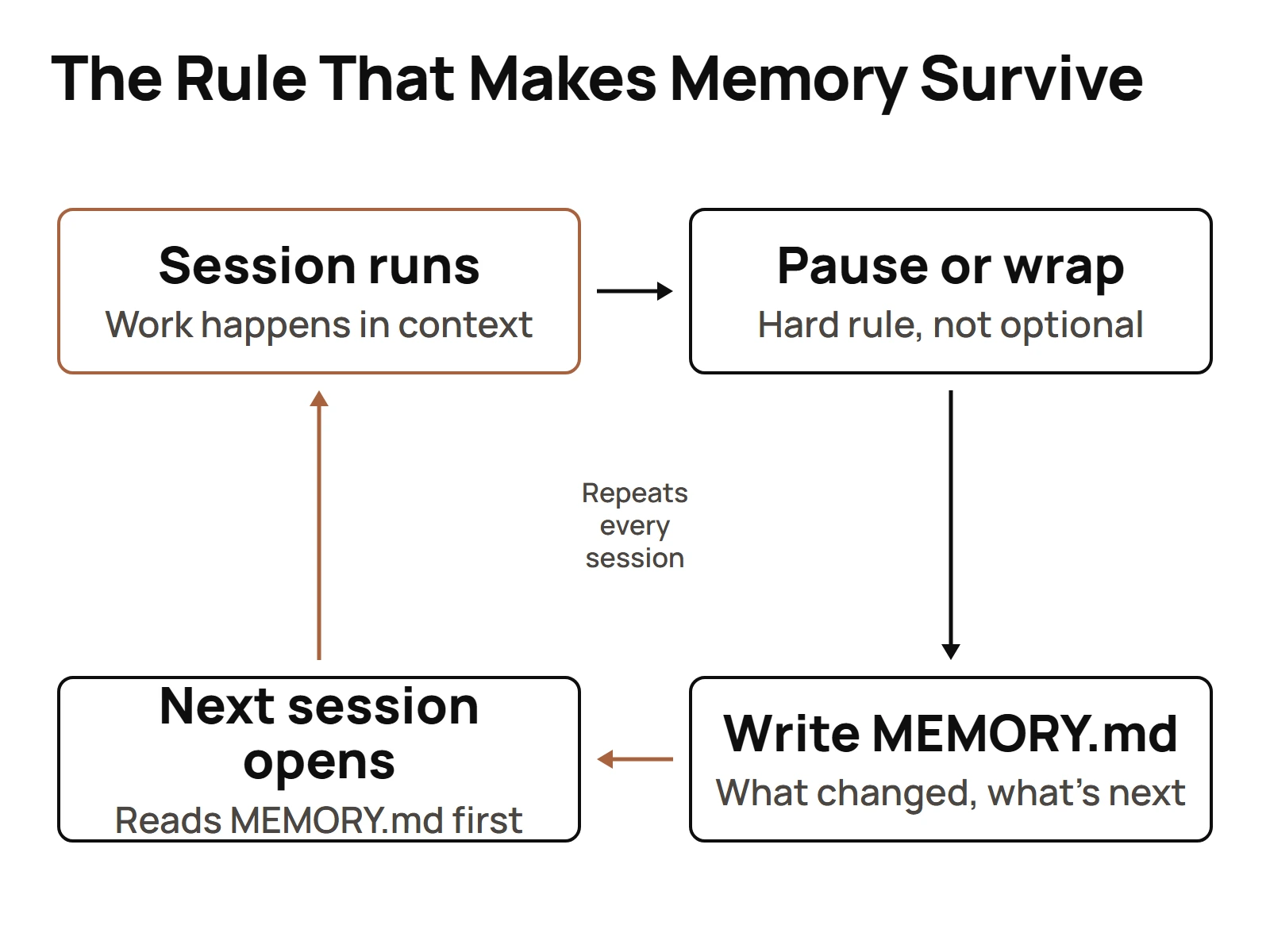
Anyone can make an agent look smart mid-conversation. The context is full, everything you said ten minutes ago is right there. The real test is the restart. Close the terminal, come back tomorrow, and see what the agent knows. If it asks you who it is and what it was working on, the memory system failed, no matter how good the diagram looked.
So the trigger had to be the one thing that always happens: the session ending. In my registry the mechanism reads plainly: "session notes + per-agent MEMORY.md, pushed on every /wrap." My consolidated agent records say the same thing from the other end: agents recall their memory bank at session start and write findings when a subagent stops.
And I didn't leave the boundaries to good intentions either. My live settings.json registers hooks on the session events themselves, SessionStart, SubagentStop and SessionEnd among them, so every open and every close leaves a record on disk no matter what the model decided. A hook fires whether the model wanted it to or not. That's the difference between a rule and a habit.
What goes into the close matters as much as the timing. My shipping rules make every session append a dated entry to that project's folder in my Obsidian vault: what changed, the commits, the PRs, the deploys, the blockers. The rule says it flat out: "over-logging is correct, under-logging is not." I'd rather prune a long note than rebuild a lost afternoon from nothing.
The other half is not starting cold. I ran a pilot that imported old Claude project conversations straight into a dedicated Hindsight memory bank, tagged source:claude-projects and agent:auto-memory-import. The idea was simple: a brand new agent shouldn't have to earn a history from zero if the history already exists in old chats. I go deeper on how I actually structure that MEMORY.md in its own piece.
Sharing one memory store across several agents
One agent with a good MEMORY.md is solved. Forty agents is a different problem, because now agent A needs to know what agent B found last Tuesday.
That's what the shared layer is for. The stack decision is on record: "Hindsight (self-host $0 + Cloud backup) + Master Brain + your own graph viz," with Hindsight Cloud noted as cheap, around $2 to $3 for the full thing. The design goal in that same note is the whole idea in one line: every agent "remembers their own work, injected automatically."
I didn't land there on the first try. My memory backends have included Mem0 and Hindsight, and another option, Remembra, got evaluated and rejected. I'm telling you that because the current stack wasn't the only stack. It's the one that survived.
The Master Brain is the one searchable store behind all of it. It's live, not a slide. My memory steward agent, Memz, writes its own records into an agent_memories table there, with separately timestamped entries from June 21 and June 22 of this year. The memory system is using itself.
One rule keeps this from turning into chaos: there's exactly one Master Brain. Nobody gets to spin up a second knowledge store because it felt faster for one project. Two brains means two versions of the truth, and then no agent can trust either one.
And searching comes before guessing. The standing instruction across my fleet is that before an agent says it doesn't know something, it queries the Master Brain first. That one habit is what turns a big memory store from a storage bill into something that actually changes answers.
So the shape looks like this. Each Claude Code session reads its CLAUDE.md files and its own memory on start. Each agent writes its MEMORY.md on close. Anything that matters across agents lands in the one shared store, where any agent can search it later instead of loading it every time.
If you're starting from scratch, don't build all of that on day one. Build the write-on-close habit first. Everything else stacks on top of it. The full Claude Code setup around it is in the full Claude Code workflow.
Questions people actually ask
- Does the Claude code keep memory?
- Not the conversation. The context window closes with the session. What carries over is files on disk: CLAUDE.md instruction files and memory files like MEMORY.md, which load again when the next session starts. So the real work is deciding what gets written down, and making sure it gets written on every close.
- How much memory for a Claude code?
- The memory that limits you day to day is context, not RAM. Every prompt, file read and tool call draws from one plan allowance, and Anthropic publishes no token count for any plan. Anything that loads every session costs you every session, so keep CLAUDE.md and MEMORY.md short and search the rest.
- Where does Claude code write its memory?
- To plain files you can open. In my setup that means a global CLAUDE.md in ~/.claude, a CLAUDE.md at each repo root, a per-project memory folder under ~/.claude/projects with a MEMORY.md index, and a MEMORY.md for every agent, pushed on every /wrap. Findings shared across agents go to one Master Brain.
- What does the Claude code memory Skill do?
- A memory skill decides when and where the agent saves, so saving stops depending on it remembering to. My /pause skill updates control files, exports the full dialog, rewrites RESUME.md, saves to every memory store, secret-scans, commits and pushes. Then /resume loads all of it back and starts the next ready action.