

Claude Skills: How to Build One That Survives Production

A Claude skill is a folder with one required file, a SKILL.md, that teaches Claude Code how to do one specific job. You build one by writing a sharp description, short numbered instructions and any scripts the job needs, then testing that the skill actually fires when it should. That last step is where most skills die.
I run a library of 1,082 skills across my agent fleet. So this isn't a syntax walkthrough. This is how I build a skill that gets called, does the job, and keeps doing it six months later.
What a Claude skill is, and what it's not
A Skill is packaged know-how. You write it once, you install it, and from then on Claude Code can pull it in whenever a task matches.
Anthropic announced Agent Skills on October 16, 2025, and released the spec as an open standard on December 18, 2025. Reports from that window have OpenAI bringing skills to Codex CLI and ChatGPT, Google adding them to Gemini CLI, and GitHub Copilot launching support. Why does that matter? Because a SKILL.md you write today isn't locked to one vendor. You're building portable agent tooling, not a Claude plugin.
Now here's what a skill is NOT, and people mix these up constantly. Claude Code gives you five different primitives, and each one has a different job:
- Skills are reusable instructions.
- Subagents are specialized workers that run inside a session.
- Hooks are the deterministic layer. They fire on lifecycle events no matter what the model decides.
- MCP connects Claude to external systems.
- Agent teams coordinate separate sessions working together.
If you need something to happen every single time, no exceptions, that's a hook, not a skill. A skill is model-discretionary. The model reads it and decides whether to use it. If you need to reach a database or a third-party API, that's MCP or a CLI, and the skill just tells the agent how to use it well.
Get this split right and half your "my skill does not work" problems disappear before you write a line.
Do you need coding skills for Claude Code?
No, not to build most skills. A SKILL.md is YAML frontmatter on top of plain Markdown, so if you can write clear instructions for a new hire, you can write a skill.
Where code comes in is the bundled scripts. A skill that only carries instructions needs zero programming. A skill that ships a Python script, a CLI or a scraper needs someone who can write and test that code, or at least someone who can get Claude Code to write it and then verify it works.
Here's the breakdown from my own library:
| Skill type | Coding needed? | Example of the job |
|---|---|---|
| Pure instructions | None | A writing checklist, a review rubric, an SOP |
| Instructions plus a template | Very little | A brief format, a report layout |
| Instructions plus a script | Yes, or verified AI-written code | A scraper, a converter, an API client |
| A full CLI wrapped as a skill | Yes | Anything that has to return clean JSON |
The first two rows are where most people should start. You learn how the description routes the skill, how the instructions get followed, and where they break, without debugging code at the same time.
How do I build a Claude code skill?
You create a folder, put a SKILL.md inside it with a name and description in the frontmatter, write the instructions below that, and add any reference files or scripts the instructions point to. Then you test it on real tasks until it fires on the right requests and stays quiet on the wrong ones.
Here's the order I work in, every time:
- Check the registry first. Before I build anything I search what I already have. My own rule says it plainly: "REGISTRY FIRST, you probably already built it." With 1,498 repos and 1,082 skills, building a duplicate is named in my own rules as the number one failure mode of the whole workspace.
- Write the description before the body. One or two sentences: what the skill does and exactly when to use it. Include the phrases a real request would contain.
- Write the instructions as steps. Numbered, short, one action each. Say what done looks like.
- Move bulk into reference files. Long examples, tables and edge cases go in separate files the instructions point to. More on why in the next section.
- Add scripts only when the job needs determinism. If the output has to be exact every time, a script beats prose.
- Test the trigger. Ask for the job three different ways. Then ask for something adjacent that should NOT fire it.
- Run it against the build standard before it ships. That standard gets its own section below.
The step people skip is six. They test that the skill works when they call it by name, and never test whether the model reaches for it on its own. That's the whole game.
The anatomy of a SKILL.md that an agent can actually load
A SKILL.md has two parts: YAML frontmatter with the name and description, then the Markdown instructions. Simple. The part nobody explains well is how those pieces get loaded, and it changes how you should write every skill.
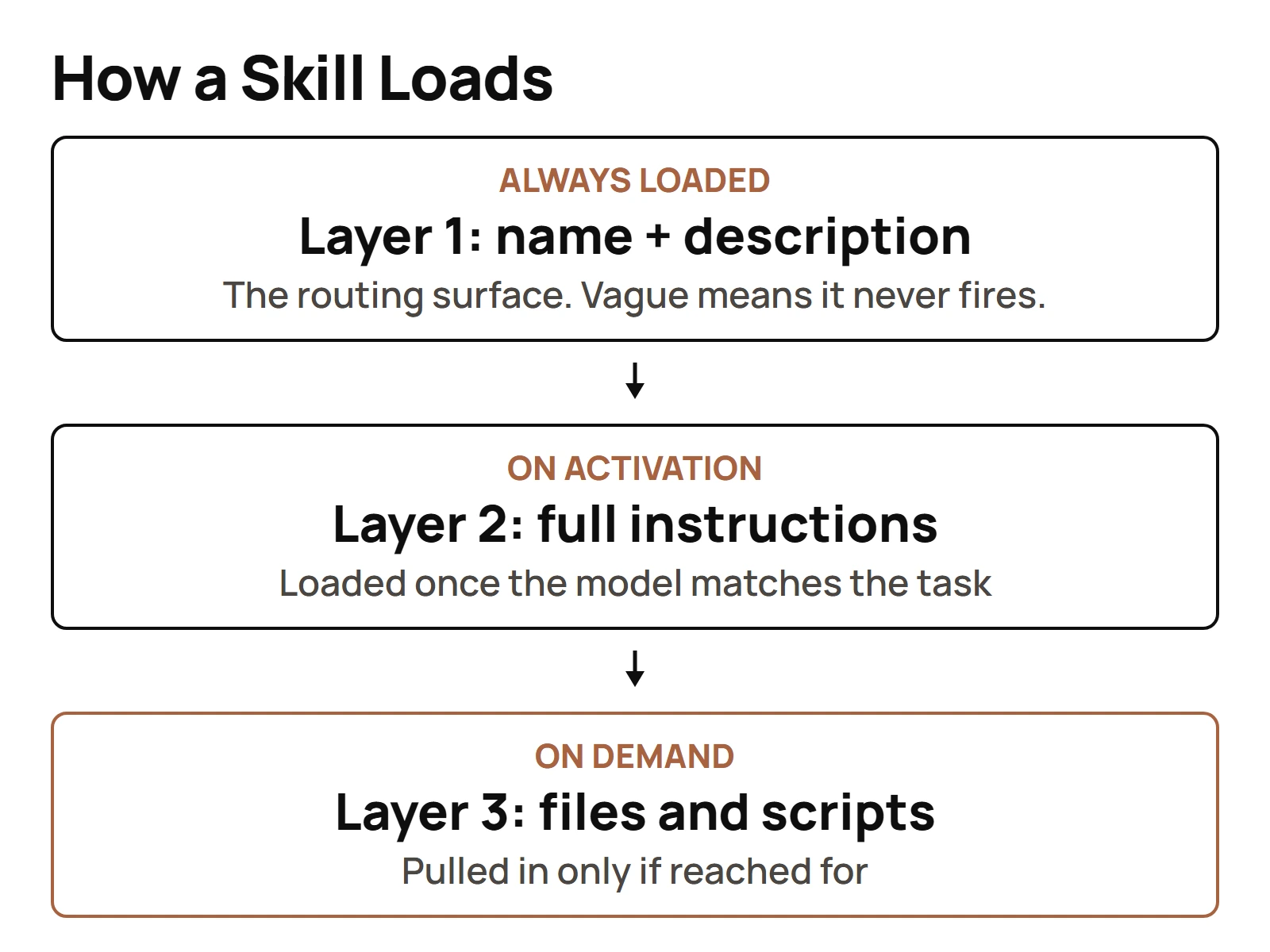
The platform loads a skill in three layers:
- Always loaded: just the name and the description. That runs roughly 50 to 100 tokens per skill.
- Loaded on activation: the full instruction body, once the model decides the skill is relevant.
- Loaded on demand: reference files and bundled scripts, only if the instructions reach for them.
That's progressive disclosure, and it's the reason I can keep a thousand-plus skills installed without blowing up the context window. The resting cost of a skill nobody is using is one short description. That's it.
It also tells you where to spend your effort. The description is the ONLY part of the skill the model sees before it decides whether to use it. The description field is the router. A skill with a perfect body and a vague description never fires. Ever.
So a weak description reads like this:
name: seo-helper
description: Helps with SEO tasks.
That matches everything and nothing. A strong one names the job and the trigger:
name: meta-title-description
description: Writes meta titles under 60 characters and meta descriptions under 160 for a given page. Use when asked for meta tags, SERP snippets, or title and description rewrites.
Second one tells the model what it does, the limits it respects, and the exact phrases that should wake it up.
Then the body. Keep the body to the steps and the rules. Anything the agent only needs sometimes, a long example, a lookup table, a list of edge cases, goes into a reference file. Every line in the body loads every time the skill fires. Every line in a reference file loads only when it earns it.
What are the best skills to add to a Claude code?
The best skills to add are the ones you'll call every week: session handoff, browsing, syncing, and whatever repeatable job eats your time. Not the flashy ones. I know this because I measured my own library, and the answer was humbling.
Back on June 21, 2026, my skill usage dashboard tracked 679 installed skills and ranked them by actual use. The top of the list:
| Rank | Skill | Sessions it appeared in |
|---|---|---|
| 1 | control plane | 369 |
| 2 | browse | 40 |
| 3 | pause | 31 |
| 4 | sync | 26 |
Look at the drop from first to second. One skill carried a massive share of the real use, and the rest of the top four were plain workflow skills. Browse. Pause and save state. Sync. Boring? Sure. Boring is what gets used.
The same dashboard had a "Dead Weight" view: skills with zero use, installed 60-plus days, flagged for review. A separate audit across my logs found somewhere between 71 and 95 skills with zero evidence of ever being used. I built or installed every one of those. Somebody thought they were a good idea, and that somebody was me.
So my recommendation for your first skills:
- A session handoff skill. Something like my pause and resume pair, which saves state so the next session, or a different agent, picks up exactly where you stopped. I call it with a slash command,
/pause, and it sits in my top four by real use. - A browsing or research skill that tells the agent how you want sources checked and cited.
- One skill for the job you repeat most. For me that includes a skill that clones a whole site design into a reusable template. For you it might be a report, a review or a deploy check.
Start with three that you'll use. Not thirty that you might.
The build standard every skill has to pass before it ships
Every tool in my library has to clear a fixed bar I call cli-first-routing. It's written down in the tools folder's instruction file and it's not optional:
- A
README.md - A
SKILL.md - A
--helpflag - A
--jsonoutput mode - Deterministic exit codes
- No raw secrets in source
- A smoke test
Seven checks. None of them is decoration.
The --json mode matters because agents parse output. Pretty text for humans is fine, but an agent chaining your tool into the next step needs structure it can trust. Deterministic exit codes matter for the same reason: the agent needs to know, without reading a paragraph, whether the thing worked. And the smoke test is the difference between "I think it works" and "it worked five minutes ago on a real input."
On top of that bar, I grade the SKILL.md itself. I ran the same grading prompt on June 11 and June 12, 2026, scoring skills strictly on five criteria, and the first two carry most of the weight:
- Description quality. Is the description clear, and does it say WHEN to trigger the skill?
- Trigger clarity.
Here's what I love about that. I landed on "grade the description and the trigger first" from running a big library day to day. The spec lands in the same place, because the spec made the description the routing surface. When your own practice and the vendor's design agree independently, that's a strong signal you're grading the right thing.
One more line I hold hard. A thing an agent uses, a CLI, an MCP client, a script, is a tool. A thing that IS an agent isn't a skill, it goes somewhere else. That one rule keeps a skill library from turning into a junk drawer of half-agents. It's part of the naming doctrine behind every skill I ship: name the thing for the job it does, so the name itself tells every agent what it's for.
How to learn Claude code skills?
Learn by reading good skills, building one small skill end to end, and then grading it hard. Reading tutorials alone won't get you there, because the skill that matters is writing a description that routes.
The path I'd give anyone starting today:
- Read five skills you already use. Open the SKILL.md. Look only at the description first. Could you tell from that one field when it should fire?
- Build a pure-instruction skill. No scripts. Something you do weekly, like a checklist for publishing a post.
- Break it on purpose. Ask for the job in words the description doesn't contain. See if it fires. Rewrite the description. Try again.
- Split the body. Move anything long into a reference file and watch the skill stay just as useful with a lighter body.
- Add one script. Once the routing works, give the skill a real script with a
--jsonmode and a smoke test. - Grade it. Description quality and trigger clarity first, then the rest.
The mistakes I see most, in roughly the order they show up:
- A description that describes the topic, not the trigger. "Helps with email" versus "Use when asked to draft, triage or reply to email." Only the second one routes.
- A body that tries to hold everything. If the skill needs a 400-line reference, that reference belongs in its own file.
- No negative test. The skill fires on the right request and ALSO on three wrong ones, and nobody notices until it hijacks an unrelated task.
- A script with no exit code discipline. The agent can't tell a failure from a success, so it plows ahead on bad output.
Then keep going. Honestly the biggest teacher is your own usage data. Once you have enough skills, the question stops being "how do I write one" and becomes "which of these am I actually using." At 1,082 skills the hard problem isn't authoring anymore. It's discovery. That's why I lean on a registry and a semantic search before I build anything.
Skills that replace a tool you're currently paying for
This is where skills get fun. A lot of paid tools are a thin layer of workflow over something you can drive yourself, and a well-built skill can be that layer.
A few patterns from my own setup:
- Cost control as a skill. I built and installed
gemini-api-caching, a skill for implementing context caching to cut costs on repeated context, covering cache creation, listing, TTL configuration and the savings math. That job doesn't need a subscription dashboard. It needs a skill that knows the lifecycle. - Site work as a skill. My site cloning flow is a skill, and the rebrand side comes down to driving a rebuild from one config file. That's workflow I'd otherwise be buying as a template or a page builder.
- Model access as a skill. Wiring an open-weight model into a skill means a whole class of bulk jobs can run on a model you don't pay a seat for. The setup for wiring an open-weight model into a skill lives in its own guide.
If you want the bigger picture on which subscriptions are worth dropping, I wrote up skills that replace a paid subscription outright, including where the free option quietly costs you something else.
One more decision you'll hit: skill, MCP server or plain CLI? Not every integration needs MCP. I run chaser-cli as a pure REST client on purpose, bearer token in, JSON out, no MCP layer at all, because plain REST was enough for that job. On the other side, I run merlino-sops-mcp as one MCP server covering 37 categories instead of dozens of separate servers. The skill sits on top of either one and teaches the agent when and how to call it. Pick the lightest layer that does the job, then let the skill carry the judgment.
The rule I'd leave you with: before you pay for a tool, ask whether its core job fits in a SKILL.md, a script and a smoke test. Before you build that skill, check whether you already built it. Registry first. Then build. Then grade it until it earns its place in the library.
Questions people actually ask
- How to learn Claude code skills?
- Read the SKILL.md files of skills you already use, starting with the description field. Then build one small instruction-only skill, test whether it fires on requests worded different ways, move long material into reference files, add a script with a --json mode and a smoke test, and grade the description and trigger first.
- What are the best skills to add to a Claude code?
- The ones you'll call every week. When I ranked 679 installed skills by real use in June 2026, the top four were a control plane skill, browse, pause and sync, plain workflow skills. Start with a session handoff skill, a research skill and one skill for the job you repeat most.
- Do you need coding skills for Claude Code?
- Not for most skills. A SKILL.md is YAML frontmatter on top of plain Markdown, so clear written instructions are enough. You need coding, or carefully verified AI-written code, only when the skill bundles a script, a CLI or an API client that has to return exact output.
- How do I build a Claude code?
- To build a Claude Code skill, check your registry for an existing one, then create a folder with a SKILL.md holding a name and a description that says when to trigger. Write short numbered instructions, move bulk into reference files, add scripts only where output must be exact, and test the trigger.