

Best AI Coding Assistant 2026: Routed, Not Ranked

The best AI coding assistant in 2026 isn't one tool. It's the right tool routed to the right job. I run Claude Code as my default in every terminal, Codex as a dispatched second lane, and Gemini CLI for search-grounded and huge-context reads. For the IDE-first side, Cursor is the one I'd evaluate, though it's not one of my production lanes. The honest answer is a routing table, not a winner.
That's not me dodging the question. That's the question, answered by somebody who has to ship with these tools every single day.
Here's the context, so you know where my opinion comes from. My agency runs roughly 40 named agents, 1,082 skills, 219 tools, 1,498 repos and a semantic brain of about 850,000 vectors. None of that works on vibes. Every agent has a lane, and every lane has a tool behind it.
So when someone asks me which AI coding assistant is best, my first answer is always: best at WHAT?
What is the best AI assistant for coding?
The best AI assistant for coding depends on the task, and anyone who crowns one tool for everything is selling you something. My documented rule is "AND not OR. Layer tools by strength, never lock into one when combining gives better results." Claude Code is my default, Codex is my second lane, and Gemini CLI covers search and giant codebases.
I want to be straight about what that's and what it's not.
It's my routing policy. It's written down in my own agent definitions, and it runs my fleet.
It's not a benchmark. Nobody in my chain ran a controlled head-to-head, and I refuse to pretend a blog ranking is a measurement. Most "best AI coding assistant" lists pick a winner because a listicle needs one. I don't need one. I need the work done.
Here's what I run, and why each one earned its seat:
- Claude Code is the default identity in every terminal I open. Named specialist agents load into it from generated loader files, all sourced from one canonical ecosystem repo. When I sit down to work, I'm talking to Claude Code.
- Codex is a live second lane with a dispatch-first rule. When a named owner exists for the work, the job routes through dispatch to the right profile instead of me running Codex directly. Direct Codex use is kept for bounded worker lanes, read-only inspection, or one-shot actions.
- Gemini CLI is installed globally as
@google/gemini-cliand used for two specific strengths: real-time Google Search grounding and a 1M-token context window for reading large codebases. - Hermes and OpenClaw are runtimes, not assistants. They host agents. They are the place the work runs, not the brain doing it.
Notice what's missing from that list: a single winner. That's the point.
What are AI coding assistants?
AI coding assistants are tools that use a large language model to write, edit, explain and review code for you. The 2026 split is between assistants that live inside an editor and suggest code as you type, and agentic coding tools that take a task, read your repo, run commands and make multi-file changes on their own.
That split matters more than any brand name.
Editor-first assistants sit inside your IDE. You stay in the driver's seat, and the assistant autocompletes, answers questions and edits the file in front of you. Cursor is the obvious name in this camp.
Agentic coding tools start from the terminal. You describe the job, and the tool plans, reads files, runs the tests and comes back with the change. Claude Code, Codex and Gemini CLI all live here.
For an agency running dozens of agents, the agentic side is where the leverage is, you know, because an agent doesn't need a human sitting in an editor to make progress. It needs a clear task, the right context, and a way to prove the work is done.
For a solo developer who likes to see every line as it's written, an editor-first tool might be the better fit. Neither camp is wrong. They solve different problems.
How I route work between them, task by task
This part is my actual setup, not a feature table.
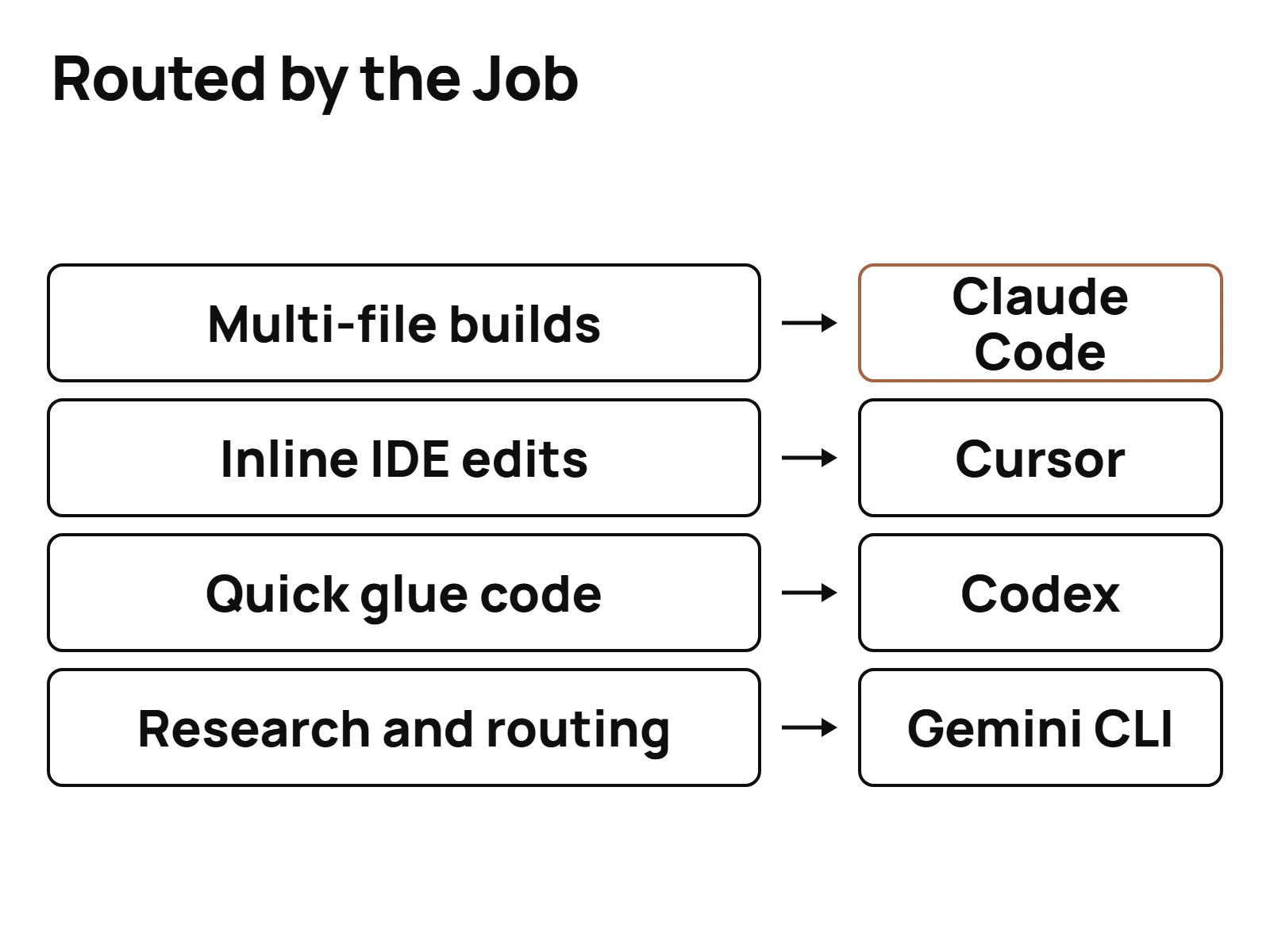
Claude Code gets the default. SEO content, agency workflows, brand and ICP work, and the day-to-day build. It's the identity every terminal opens to, so it catches everything that doesn't have a more specific home.
Codex gets dispatched work. When a job has a named owner, it routes to that owner's profile. When I just need a bounded worker, a read-only inspection or a one-shot action, Codex runs it directly.
Gemini CLI gets search and scale. When the task needs live Google Search grounding, or when I need to hold a very large codebase in context at once, Gemini is the call. My own documented division of labor: Gemini for search-grounded and huge-context work, Claude for SEO content, agency workflows and brand work.
Inside the Claude lane, there's a second routing layer that decides which model a worker agent gets:
| Model | What it gets | Why |
|---|---|---|
| Opus | Complex reasoning, architecture, strategy, security | Default for important work |
| Sonnet | Standard analysis, content writing, routine tasks | Strong and cheaper for the middle of the pile |
| Haiku | Simple lookups, data extraction, formatting, one-off transforms | Fast and cheap for mechanical jobs |
That table is the single most useful thing I can give you. Most people pick one model and throw everything at it. That's how you pay top-tier prices for formatting a CSV.
Match the model to the job. Your bill and your output both get better.
And if you're one developer, not an agency? Same logic, smaller table. Pick one assistant as your default for the bulk of the work. Add a second only when a job keeps showing up that the first one handles badly, like live search or a codebase too big to hold in one window. Two lanes is plenty for most people. The mistake isn't picking the "wrong" tool. The mistake is paying for four tools that all do the same job, you know, and routing nothing on purpose.
If you want to start where I start every day, get started with my actual daily driver. If you're weighing the two most-compared tools head to head, I wrote up the full Claude Code vs Cursor breakdown.
Is there a free AI code assistant?
Yes. Cursor's Hobby plan is free, and it's the easiest no-cost entry point to an IDE-based assistant. Open-weight models are the other free route: DeepSeek V4 shipped as an open-weight preview on 2026-04-24 under the MIT License, which means you can download it, self-host it and use it commercially without paying for a subscription.
But free has a catch in both cases.
The free tier catch. A free plan is a trial of the workflow, not a production setup. Every paid Cursor plan carries included usage pools that reset monthly, and a free plan is built to show you the product, not to run an agency on.
The open-weight catch. MIT-licensed weights are free. The hardware isn't. As of September 2026, comparison roundups describe the largest open models as needing multi-GPU clusters to self-host. The more practical tier is the smaller one: DeepSeek V4-Flash is reported to bring near-frontier quality to 2-GPU setups. Nobody in my research chain tested that claim, so treat it as the sources' claim, not mine.
There's a middle path I actually use. One OpenRouter key gives my fleet access to a big catalog of models, open-weight ones included, at API prices. No hardware to buy. No subscription to lock into. My own session notes recorded that lane as "all 6 lanes wired and live-tested," with OpenRouter as "the big one, 300+ models, one key." Treat that 300 figure as my note at the time, not a vendor count.
What is the cheapest AI coding assistant?
The cheapest AI coding assistant is the free tier of one you already like, then the entry paid plans, which cluster around $20 a month as of September 2026. Cursor Pro is $20 a month, or about $16 billed annually, and Claude Pro is also $20 a month. On raw API price, xAI's own pricing page lists Grok Build 0.1 at $1.00 per million input tokens as of 2026-09-23.
Here are the numbers I can actually source, all dated September 2026:
| Option | Price | Note |
|---|---|---|
| Cursor Hobby | Free | Entry point |
| Cursor Pro | $20/mo (about $16/mo annual) | Two monthly usage pools |
| Claude Pro | $20/mo | Two meters: five-hour session and weekly |
| Claude Max 5x | $100/mo | Described as 5x Pro |
| Claude Max 20x | $200/mo | Described as 20x Pro |
| Cursor Pro+ | $60/mo | More included usage |
| Cursor Ultra | $200/mo | Top individual tier |
| Grok Build 0.1 (API) | $1.00/M input, $2.00/M output | Coding-specific, cheapest in xAI's table |
Prices in this space change constantly. Cursor's pricing alone has moved enough times to be its own news topic. Check the vendor page before you buy anything, and don't trust a price in a post that doesn't say when it was checked.
Cost per outcome, not cost per seat
Here's where most comparisons go wrong. They compare the sticker price of a seat. That tells you almost nothing.
What matters is what one finished outcome costs you. A shipped feature. A fixed bug. A published article. A cheap seat that burns its allowance halfway through the week costs more than a pricier one that finishes the job.
Two structural details decide that math, and almost nobody puts them side by side.
Claude meters everything from one allowance. Every prompt, tool call, file read and thinking block draws from the same plan allowance. There's no separate budget for reading files versus writing code. So a session that reads 40 files to orient itself has spent real allowance before it writes a single line. Anthropic also publishes no token count for Pro or any other plan, so the only real view of your remaining room is /usage in Claude Code or the Usage page on claude.ai.
Cursor splits the meter in two. Each paid Cursor plan has two separate usage pools that reset monthly. Pool one, which Cursor calls Cursor Models, covers Grok 4.7, Grok 4.6, Grok 4.5 and Composer 2.5, and carries significantly more included usage. Pool two covers third-party models like Claude, GPT and Gemini, charged at each model's API price. Auto mode isn't a free pass either: since 2026-08-24, every Auto request bills at the list price of whichever model it gets routed to.
Read those two together and the incentives get clear. Cursor makes its own models cheap inside its plan. Composer 2.5 is Cursor's first-party model, and Cursor describes it as delivering frontier-level coding "at a fraction of the cost of third-party models." That performance claim is the vendor's. I haven't seen a benchmark I'd stand behind, so I'm not repeating it as fact.
And here's the complication on my own side. When the plan is flat, token cost stops feeling real, even though it is. That's exactly why I care about what I cut off the bill to make this affordable. Context discipline and caching aren't just about dollars. They are about not hitting the wall mid-week.
So, cost per outcome. Route cheap models to mechanical jobs. Route expensive models to hard ones. Keep context lean. Then compare prices.
Best for each job: a labeled shortlist
No crown. A shortlist, each one labeled with the job it's best for in my setup or, where I don't run it, why it's on the list.
Best default for agentic, terminal-first work: Claude Code. It's the identity in every terminal I open and the lane my specialist agents load into. SEO content, agency workflows, brand work and the daily build all start here.
Best dispatched second lane: Codex. When work has a named owner, Codex runs it through dispatch. For bounded, read-only or one-shot jobs, it runs directly. Two strong lanes beat one overloaded lane.
Best for live search and giant codebases: Gemini CLI. Real-time Google Search grounding plus a 1M-token context window. When I need both at once, nothing else in my stack is the call. One dated caveat: since 2026-06-18, Google only serves Gemini CLI through paid Gemini API keys and enterprise licenses, and it moved free and Google AI Pro or Ultra users to its new Antigravity CLI. Mine runs on an API key.
Best IDE-first option: Cursor. Six plans in 2026, from free Hobby up to Enterprise, and a pricing model that rewards staying on its own models. If you want an assistant living inside your editor, this is the one to evaluate first.
Newest frontier model to watch: GPT-6 Astra. OpenAI released it as a limited preview on 2026-09-03 and to paid users the next day, in a restricted version. It's weeks old, so read where GPT-6 Astra fits in that stack before you rebuild anything around it.
Cheapest raw API rate for code in xAI's lineup: Grok Build 0.1. xAI's own pricing page lists it at $1.00 per million input tokens and $2.00 per million output as of 2026-09-23. Grok isn't one of my production lanes, and I lay out where Grok does or does not fit in a real agent stack.
The runtime layer sits underneath all of this. Hermes and OpenClaw host agents across my machines. They don't compete with any assistant on this list. They are where the assistants do the work.
The takeaway
If you remember one thing, make it this: stop asking which AI coding assistant is best, and start asking which one is best for the task in front of you.
- Pick a default for the bulk of your work.
- Add a second lane so one tool is never a single point of failure.
- Route cheap models to mechanical jobs and strong models to hard ones.
- Date every price you rely on, and re-check it before you commit.
- Give every tool a job it's best at, and write that job down so it doesn't drift.
That's how I run 40 agents without picking a favorite. Routed, not chosen. And it's the most fun I've had building anything, because every new tool that ships isn't a threat to the stack. It's just another lane to test.
Questions people actually ask
- What is the best AI assistant for coding?
- The best AI assistant for coding depends on the task, and anyone who crowns one tool for everything is selling you something. My documented rule is "AND not OR. Layer tools by strength, never lock into one when combining gives better results." Claude Code is my default, Codex is my second lane, and Gemini CLI covers search and giant codebases.
- Is there a free AI code assistant?
- Yes. Cursor's Hobby plan is free, and it's the easiest no-cost entry point to an IDE-based assistant. Open-weight models are the other free route: DeepSeek V4 shipped as an open-weight preview on 2026-04-24 under the MIT License, which means you can download it, self-host it and use it commercially without paying for a subscription.
- What are AI coding assistants?
- AI coding assistants are tools that use a large language model to write, edit, explain and review code for you. The 2026 split is between assistants that live inside an editor and suggest code as you type, and agentic coding tools that take a task, read your repo, run commands and make multi-file changes on their own.
- What is the cheapest AI coding assistant?
- The cheapest AI coding assistant is the free tier of one you already like, then the entry paid plans, which cluster around $20 a month as of September 2026. Cursor Pro is $20 a month, or about $16 billed annually, and Claude Pro is also $20 a month. On raw API price, xAI's own pricing page lists Grok Build 0.1 at $1.00 per million input tokens as of 2026-09-23.